How To
Use PepChamp
Sixty seconds to your dashboard. Then a deep dive into every feature — jump to what you need.
Sixty
seconds.
Download. Open. Five welcome slides. Five short questions. Sign in. You're on your dashboard.
Download
App Store. iOS 15.1+. Free.
Tour
Five welcome slides.
5 Questions
Personalizes your dashboard.
Sign In
Apple or email. 18+.
You're In
Home tab is your dashboard.
The 7 Tabs.
Tap a tab to expand its walkthrough.
01 · Home
Your daily dashboard.
expand_more
01 · Home
Your daily dashboard.
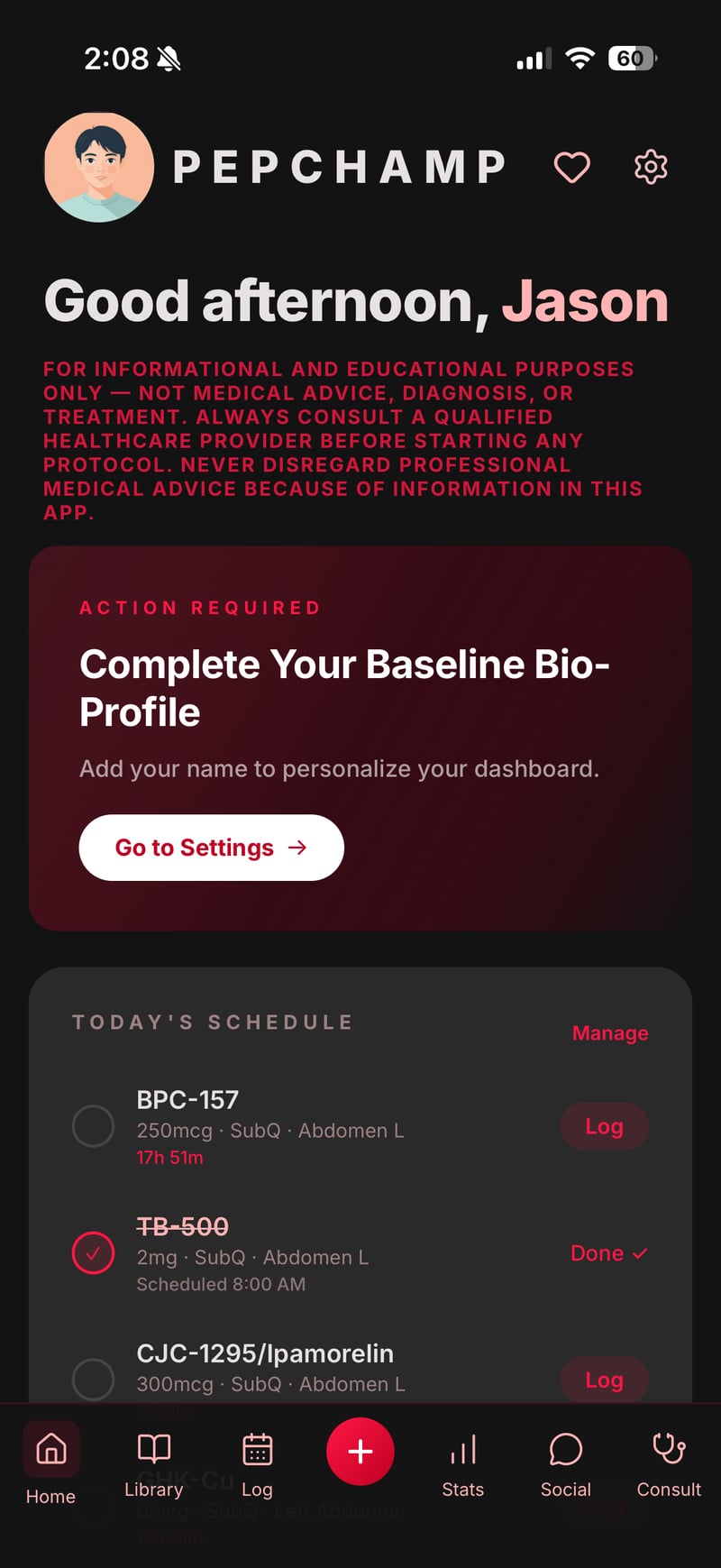
Today's scheduled doses sit at the top. Tap any dose to mark it as taken. The adherence ring tracks your completion percentage for the current cycle. The streak counter rewards consecutive days.
Below the rings, the Pro Tools grid opens advanced features: Protocol Store, Templates, Cycle Calendar, Body Map, Blood Work, Inventory, AI Q&A, and Cycle Insights.
Live on Home
- — Today's Schedule card
- — Adherence ring
- — Streak counter
- — 8 Pro Tools tiles
- — Profile completion banner
02 · Library
50+ research peptides.
expand_more
02 · Library
50+ research peptides.
Each card shows mechanism of action, reported benefits framed as research summaries, side-effect profiles from published literature, and PubMed citations.
Tap the heart to wishlist. Tap Track This Peptide to start a protocol around it. Prescription-only peptides carry a clear banner.
Categories
Recovery · Growth hormone · Longevity · Sleep · Immune · Fat metabolism · Sexual wellness
03 · Log
Mark doses taken.
expand_more
03 · Log
Mark doses taken.
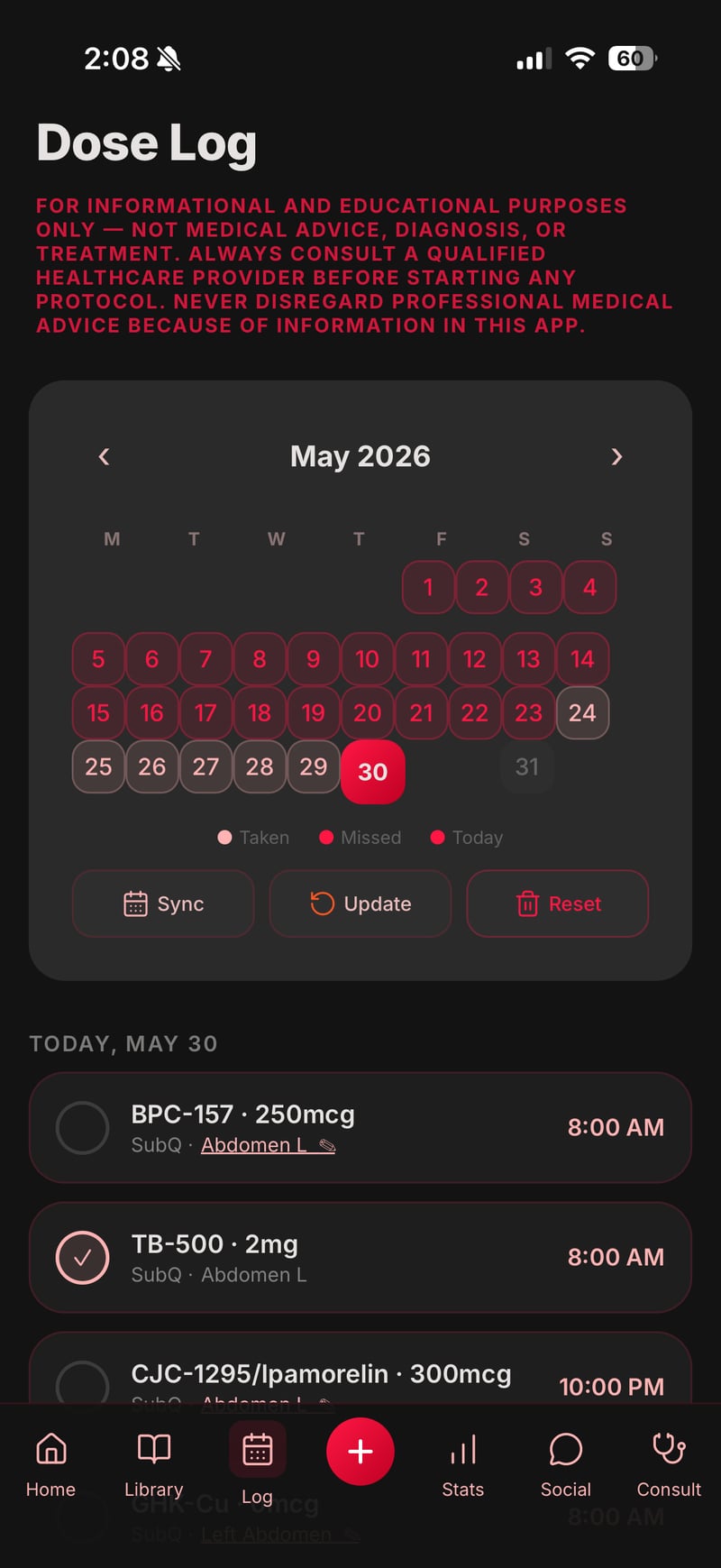
Tap the status pill on each scheduled dose card. Tap the site label to open the bottom-sheet picker — the rotation algorithm highlights the next suggested site in cyan.
Toggle to calendar view to see the whole month with red and green markers for taken vs. missed.
04 · Add
Create a protocol.
expand_more
04 · Add
Create a protocol.
Name it. Pick peptides from the Library. Choose frequency (daily, EOD, MWF, or custom). Set duration in weeks. Enter the dose your healthcare provider has set with you — the app never pre-fills. Pick rotation order. Save.
Or skip manual setup and start from a Research Guide template ($1.99 each, optional).
05 · Stats
Trends, charted.
expand_more
05 · Stats
Trends, charted.
Week and month adherence percentages. Streak history. A My Protocol card listing every peptide you're tracking with dose, frequency, and tag pills.
Log blood-work values (IGF-1, fasting glucose, HbA1c, hsCRP, ALT, AST) and they chart over time. Wellness logs (sleep, mood, energy, weight) reveal patterns.
06 · Community
PepHead Community.
expand_more
06 · Community
PepHead Community.
A threaded forum. Accept the Community Guidelines on first open. Categories cover General, Protocols, Results, and Questions.
Every post and reply carries Report and Block icons. Reports are reviewed within 24 hours. Zero-tolerance for harassment, buy/sell discussion, and dangerous misinformation.
07 · Consult
Talk to a nurse.
expand_more
07 · Consult
Talk to a nurse.
Optional thirty-minute educational video calls with state-licensed Registered Nurses. Complimentary during launch.
Save your address in Settings first (required for state-licensure filtering). Pick a practitioner licensed in your state, choose a 30-minute slot, tap Book Consultation. At call time, tap Join Call.
These calls are educational only. The nurse can discuss published research, help you understand lab terminology, and answer general questions — but cannot diagnose, prescribe, order labs, or recommend doses.
Cancellation
Cancel up to 1 hour before the call.
Unlock everything.
All three tiers unlock the same Pro features. Cancel anytime in iOS Settings.
7-day free trial. Auto-renews.
7-day free trial. Auto-renews.
No recurring. No expiration.
What Pro unlocks — 9 features
expand_more
AI Q&A Assistant
Chat with Google Gemini about peptide research. Consent modal explains what's sent.
AI Research Helper
Answer a questionnaire, get a research overview for your provider.
Cycle Insights
AI generates discussion topics. Never suggests dose changes.
Interaction Checker
Local database. No AI, no external calls.
Premium Articles
Nine research-summary articles on cycling, labs, technique.
Half-Life Charts
Visualize peptide concentrations over time.
Cycle Calendar
Month grid of past + scheduled doses across all protocols.
Body Map
Visual rotation across 8 standard sites.
Custom Templates
Save your own protocols as reusable templates.
14 Research Guides.
$1.99 each. One-time. No subscription.
Each unlocks a research summary, mechanism overview, dose ranges from research, and PubMed citations.
Recovery
BPC-157, TB-500
Growth Hormone
CJC-1295, Ipa
Weight Mgmt
AOD-9604, Tesa
Longevity
Epitalon, GHK-Cu
Sleep & Recovery
DSIP, Ipa
Immune Mod
Thymosin Alpha-1
Recovery + Collagen
BPC-157 + collagen
GH + Recovery
Tissue repair
GH + IGF-1
CJC/Ipa + IGF-1
Visceral Fat
Tesa + AOD
Mitochondrial
MOTS-c, SS-31
Longevity Dual
Multi-pathway
Epithalon + GH
Telomere research
Extended Longevity
Comprehensive
Home → Protocol Store · Settings → Preferences → Protocol Store
More to discover.
Consent first. Always.
PepChamp uses Google Gemini for three optional features only: AI Q&A Assistant, AI Research Helper, and Cycle Insights.
Before any data is sent, a full-screen consent modal identifies Google Gemini as the recipient and lists exactly what is and isn't sent. You must tap I Agree to proceed.
Sent To Gemini
- — Your typed questions
- — Questionnaire selections
- — Protocol metadata (names + doses)
Never Sent
- — Email, name, address, phone
- — Dose logs, body measurements
- — Blood work values
The Interaction Checker is not an AI feature. It queries a local database. No external calls. Your data stays on your device. You can withdraw consent anytime by signing out.
Manage your account.
Profile
Name, phone, weight, age, height, gender, goals.
Address
Required for nurse consultation state filtering.
Restore Purchases
Brings back Pro + paid Research Guides on a new device.
Manage Subscription
Deep-link to iOS Settings.
Reset Tracking Data
Deletes only tracking. Keeps account, Pro, Guides.
Delete My Account
Permanent. Full instructions →
What PepChamp is not.
PepChamp is an educational tracking app. It does not diagnose conditions, prescribe medications, recommend doses, or replace medical care.
Every dosing decision belongs to you and your licensed healthcare provider. Nurse consultations are educational research conversations, not clinical visits.
Ready when you are.
iOS 15.1+